Updating Expectations
Updating expectations
When a contribution changes the CDM model, the expected results that the CDM's regression tests check against usually need to be regenerated to match. This process is referred to as updating expectations, and it is a required step before most Pull Requests can be contributed to the CDM.
NOTE: The editor being used/supported in the examples in IntelliJ
What are expectations?
All CDM model changes are covered by tests: a set of sample data, organised into Test Packs, is run through the model's ingestion, validation, qualification and function logic, and the results produced are captured as expected results (or expectations). These expectations are stored as JSON files alongside the samples, under rosetta-source/src/main/resources, and are compared against the model's actual output every time the CDM is built.
- Test Pack samples include FpML documents and other industry data used to exercise the model's mapping (ingestion) logic.
- Function input and output samples exercise the CDM's standardised functions.
- Every regression test compares the current, actual output for a given sample against its stored expectation, and fails the build if the two differ.
Why expectations need to be kept up to date
Editing a data type, a mapping, a validation rule, a qualification rule or a function changes the output the model produces for the existing samples. Once that happens, the expectations recorded against the previous version of the model no longer match, and the regression tests fail, even when the model change is correct and intended.
Updating expectations regenerates those expected results from the current state of the model and its samples, so the Test Pack reflects the intended behaviour rather than the previous one. This is why the development guidelines require that all ingestion regression test expectations for mapping, validation and qualification are maintained or improved before a change is contributed.
Note:
Updating expectations rewrites files rather than checking them. A Contributor should always review the resulting diff (git status and git diff) to confirm the changes are the ones expected, and note in the contribution whether the mapping, validation or qualification success numbers have changed, as contributions should not break the current model.
Updating expectations with Maven
From the root of the repository, run:
mvn clean install -U -DskipTests -P format,update-expectations
This command combines two Maven profiles:
format, defined in therosetta-sourcemodule, formats the.rosettamodel source files.update-expectations, defined in thetestsmodule, executesCdmTestPackCreator, which re-ingests the Test Pack samples and rewrites the corresponding expectation and function sample files underrosetta-source/src/main/resources.
The remaining options serve the following purpose:
clean installrebuilds every module in the reactor, so the regenerated expectations reflect the model as it currently stands, including any local changes.-Uforces Maven to check for updated snapshot dependencies, keeping the build aligned with the latest development version of the CDM.-DskipTestsskips running the regression test suite itself, since the purpose of this command is to regenerate expectations rather than assert against them.
Updating expectations from the Maven panel
The same result can be achieved from an IDE's Maven tool window instead of the command line, for example in IntelliJ IDEA:
- Open the Maven tool window (View > Tool Windows > Maven).
- Under Profiles, tick
formatandupdate-expectations. - Under Common Domain Model > Lifecycle, select
cleanandinstall, then run them, for example with Run Maven Build.
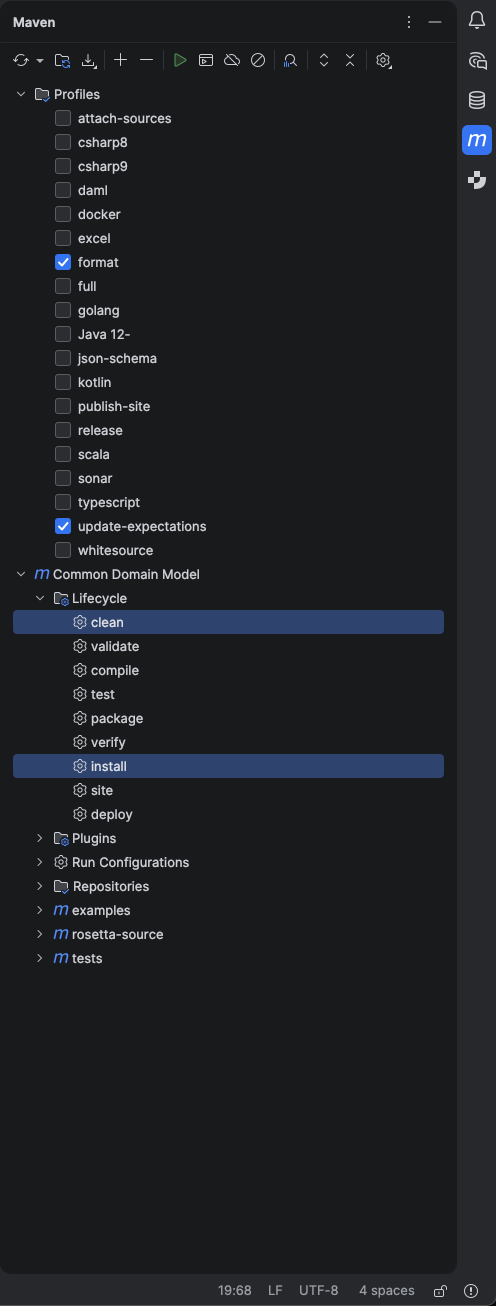
This is equivalent to running mvn clean install -P format,update-expectations from the command line. The -U and -DskipTests options can be added from the same tool window, in the Maven Runner settings or as additional command line arguments for the run.
Updating expectations with Rosetta
Setting up a local Java and Maven development environment is not the only way to work with the CDM's expectations. Rosetta, the modelling platform for the Rune DSL, is available free of charge at its community tier and provides testing and validation tooling for the CDM without requiring a local build. Users can create a read-write workspace to edit files, contribute their changes, and Rosetta will create an update-expectations PR with updated expectations. They will also have access to the 'Validation' tab to test.JSON files for validation errors.
Note: As with any CDM application component, FINOS encourages the adoption of CDM by software providers but does not endorse any CDM application component. Please refer to the Rosetta Documentation for details of its current testing and validation capabilities.
Next steps
- Review the development guidelines for the full contribution checklist.
- Review the editing the model page, which places updating expectations within the wider modelling checklist.